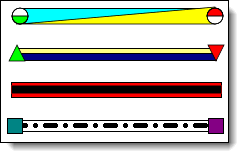
Overlay one bar on top of another bar

Question:     

Is it possible to overlay one bar from the “Combo Toolbox” on top of a different bar from the “Combo Toolbox”?


Answer:

Two bars can originate from a symbol.  Typically the connections from one symbol will go to two symbols, there is no reason why the two connections could not target a single symbol, achieving the effect you want.

  1. Set up the two bars in the toolbox.

  2. Add a symbol + bar + symbol combination to the schedule.  

  3. With , on the schedule, click once on the left-most (start) symbol.

  4. Click once, in the toolbox, on the connector to use as an overlay.  

  5. Click once on the right-most (finish) symbol.  


Related topics

Outlining and summary bars

Add many symbols above and below a bar

Add text to a horizontal bar

Horizontal bar has white stripe

Horizontal bar size


Applies to Milestones Professional:      2017        2019         2021         2023         2025


The fast easy way to schedule your projects:  Milestones Software by KIDASA Software, Inc. www.kidasa.com

Copyright © 2025 KIDASA Software, Inc. All rights reserved.