AddFreeText Example
The code below the example adds the freeform text and then sets all of the properties (font, background color, underline, text color, etc.)
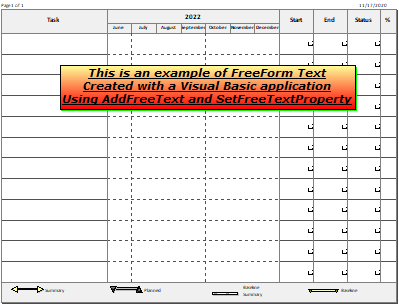
Public Sub addfreetext()
Dim textstring As String
Dim freetextindex As Integer
With milestonesobject
textstring = "This is an example of FreeForm Text" + Chr(13) + "Created with a Visual Basic application" + Chr(13) + "Using AddFreeText and SetFreeTextProperty"
freetextindex = .AddFreeText(textstring, 2, 2) ' string, x position in inches from left, y position in inches from top
.setfreetextproperty(freetextindex, "Page", 1)
.setfreetextproperty(freetextindex, "TextColor", RGB(0, 0, 0))
.setfreetextproperty(freetextindex, "Border", 1)
.setfreetextproperty(freetextindex, "Transparent", 0)
.setfreetextproperty(freetextindex, "BackgroundColor", RGB(255, 0, 0))
.setfreetextproperty(freetextindex, "BackgroundColorTarget", (RGB(255, 255, 153)))
.setfreetextproperty(freetextindex, "FadeType", 2)
.setfreetextproperty(freetextindex, "Italic", 1)
.setfreetextproperty(freetextindex, "Shadow", 1)
.setfreetextproperty(freetextindex, "ShadowColor", RGB(0, 255, 0))
.setfreetextproperty(freetextindex, "TextHeight", 22)
.setfreetextproperty(freetextindex, "Underline", 1)
.setfreetextproperty(freetextindex, "Bold", 1)
.setfreetextproperty(freetextindex, "TagInfo", "Tag Text")
.setfreetextproperty(freetextindex, "FontName", "Verdana")
.setfreetextproperty(freetextindex, "TextAlign", 1)
End With
End Sub
End Module