Example - Freeform Text Sampler
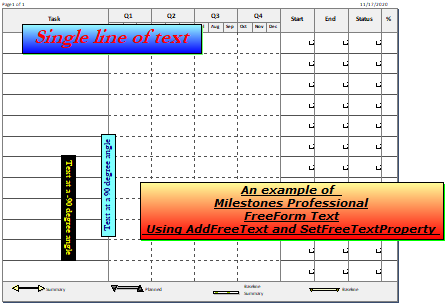
Dim textstring As String, textstring2 As String, textstring3 As String, textstring4 As String
Dim freetextindex As Integer
With milestonesobject
textstring = "An example of " + Chr(13) + "Milestones Professional" + Chr(13) + "FreeForm Text" + Chr(13) + " Using AddFreeText and SetFreeTextProperty "
' Chr(13) is a line break, forces text onto a new row
freetextindex = .AddFreeText(textstring, 2, 2) ' string, x position in inches from left, y position in inches from top
.setfreetextproperty(freetextindex, "Page", 1) ' Only on page 1
.setfreetextproperty(freetextindex, "Xpos", 4) ' change position to 4 inches in from the left edge
.setfreetextproperty(freetextindex, "Ypos", 5) ' change position to 5 inches down from the top
.setfreetextproperty(freetextindex, "TextColor", RGB(0, 0, 0)) ' set color to black
.setfreetextproperty(freetextindex, "Border", 1) ' turn on the border
.setfreetextproperty(freetextindex, "Transparent", 0) ' not transparent, so background color will appear
.setfreetextproperty(freetextindex, "BackgroundColor", RGB(255, 0, 0)) ' Set background color
.setfreetextproperty(freetextindex, "BackgroundColorTarget", (RGB(255, 255, 153))) 'Set a second color for special effects
.setfreetextproperty(freetextindex, "FadeType", 2) ' Use the Fade to top special effect
.setfreetextproperty(freetextindex, "Italic", 1) ' Turn on Italic
.setfreetextproperty(freetextindex, "Shadow", 1) ' Turn on a shadow
.setfreetextproperty(freetextindex, "ShadowColor", RGB(0, 255, 0)) ' Set the shadow color to green
.setfreetextproperty(freetextindex, "TextHeight", 22) ' Set the text size to 22 point
.setfreetextproperty(freetextindex, "Underline", 1) ' Turn on Underline
.setfreetextproperty(freetextindex, "Bold", 1) ' Turn on Bold
.setfreetextproperty(freetextindex, "TagInfo", "Text1") ' Add a tag
.setfreetextproperty(freetextindex, "FontName", "Verdana") ' Set the font
.setfreetextproperty(freetextindex, "TextAlign", 1) ' Use Center Alignment
textstring2 = " Single line of text "
freetextindex = .AddFreeText(textstring2, 2, 2) ' string, x position in inches from left, y position in inches from top
.setfreetextproperty(freetextindex, "Page", 1) ' Only on page 1
.setfreetextproperty(freetextindex, "Xpos", 1) ' change position to 1 inches in from the left edge
.setfreetextproperty(freetextindex, "Ypos", 1) ' change position to 1 inches down from the top
.setfreetextproperty(freetextindex, "TextColor", RGB(255, 0, 0)) ' set color to red
.setfreetextproperty(freetextindex, "Border", 1) ' turn on the border
.setfreetextproperty(freetextindex, "Transparent", 0) ' not transparent, so background color will appear
.setfreetextproperty(freetextindex, "BackgroundColor", RGB(0, 0, 255)) ' Set background color
.setfreetextproperty(freetextindex, "BackgroundColorTarget", (RGB(153, 255, 255))) 'Set a second color for special effects
.setfreetextproperty(freetextindex, "FadeType", 2) ' Use the Fade to top special effect
.setfreetextproperty(freetextindex, "Italic", 1) ' Turn on Italic
.setfreetextproperty(freetextindex, "Shadow", 1) ' Turn on a shadow
.setfreetextproperty(freetextindex, "ShadowColor", RGB(111, 255, 111))
.setfreetextproperty(freetextindex, "TextHeight", 38) ' Set the text size to 38 point
.setfreetextproperty(freetextindex, "Underline", 0) ' Turn off Underline
.setfreetextproperty(freetextindex, "Bold", 1) ' Turn on Bold
.setfreetextproperty(freetextindex, "TagInfo", "Text2") ' Add a tag
.setfreetextproperty(freetextindex, "FontName", "Garamond") ' Set the font
.setfreetextproperty(freetextindex, "TextAlign", 1) ' Use Center Alignment
textstring3 = " Text at a 90 degree angle "
freetextindex = .AddFreeText(textstring3, 3, 2) ' string, x position in inches from left, y position in inches from top
.setfreetextproperty(freetextindex, "textangle", 1) ' 90 degree angle
.setfreetextproperty(freetextindex, "Page", 1) ' Only on page 1
.setfreetextproperty(freetextindex, "Xpos", 3) ' change position to 3 inches in from the left edge
.setfreetextproperty(freetextindex, "Ypos", 6) ' change position to 3 inches down from the top
.setfreetextproperty(freetextindex, "TextColor", RGB(0, 0, 128)) ' set color to navy
.setfreetextproperty(freetextindex, "Border", 1) ' turn on the border
.setfreetextproperty(freetextindex, "Transparent", 0) ' not transparent, so background color will appear
.setfreetextproperty(freetextindex, "BackgroundColor", RGB(128, 255, 255)) ' Set background color to aqua
.setfreetextproperty(freetextindex, "TextHeight", 18) ' Set the text size to 18 point
.setfreetextproperty(freetextindex, "Underline", 0) ' Turn off Underline
.setfreetextproperty(freetextindex, "Bold", 1) ' Turn on Bold
.setfreetextproperty(freetextindex, "TagInfo", "Text3") ' Add a tag
.setfreetextproperty(freetextindex, "FontName", "Garamond") ' Set the font
.setfreetextproperty(freetextindex, "TextAlign", 1) ' Use Center Alignment
textstring4 = " Text at a -90 degree angle "
freetextindex = .AddFreeText(textstring4, 3, 2) ' string, x position in inches from left, y position in inches from top
.setfreetextproperty(freetextindex, "textangle", 2) ' - 90 degree angle
.setfreetextproperty(freetextindex, "Page", 1) ' Only on page 1
.setfreetextproperty(freetextindex, "Xpos", 2) ' change position to 2 inches in from the left edge
.setfreetextproperty(freetextindex, "Ypos", 4) ' change position to 3 inches down from the top
.setfreetextproperty(freetextindex, "TextColor", RGB(255, 255, 0)) ' set color to yellow
.setfreetextproperty(freetextindex, "Border", 1) ' turn on the border
.setfreetextproperty(freetextindex, "Transparent", 0) ' not transparent, so background color will appear
.setfreetextproperty(freetextindex, "BackgroundColor", RGB(0, 0, 0)) ' Set background color to black
.setfreetextproperty(freetextindex, "TextHeight", 18) ' Set the text size to 18 point
.setfreetextproperty(freetextindex, "Underline", 0) ' Turn off Underline
.setfreetextproperty(freetextindex, "Bold", 1) ' Turn on Bold
.setfreetextproperty(freetextindex, "TagInfo", "Text4") ' Add a tag
.setfreetextproperty(freetextindex, "FontName", "Garamond") ' Set the font
.setfreetextproperty(freetextindex, "TextAlign", 1) ' Use Center Alignment
End With