|
"Type"
|
arg 3 is 1-5
1 - Keyed in Global Values
2 - Sum of values keyed into task rows
3 - Allocate column values across timeline
4 - Use values from symbols
5 - Total of other ValueSets
|
|
"LineType"
|
arg 3 is 1-25
|
|
"BarPattern"
|
arg 3 is 1-57
|
|
"NumberDecimals"
|
arg 3 is 0-6
|
|
"LineColor"
|
Arg 3 is the color. See color numbering.
(use this option for both line and bar graphs)
|
|
"FillColorTarget"
|
Arg 3 is the color. See color numbering.
|
|
"FadeType"
|
Arg 3 is 0-6 (See fade types)
|
|
"HighLowConnection"
|
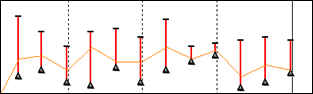
Arg 3 is 0-9, which allows for none (0) or one of the nine other ValueSets (1-9). If the DataGraph is set to be a Point Datagraph (SetDatagraphProperty(x, "LineBar", "Point") then by using two ValueSets, it's possible to display something like this.
|
|
"IncludeInSummary"
|
Arg 3 "ValueSet to Include" - takes one call for each valueset to add
|
|
"PointSymbol"
|
Arg 3 is 1-32
|
| |
|
|
"Show"
|
|
arg 3 is "NumericOn"
|
|
arg 3 is "NumericOff"
|
|
arg 3 is "GraphOn"
|
|
arg 3 is "GraphOff"
|
|
arg 3 is "NumericCumulativeOn"
|
|
arg 3 is "NumericCumulativeOff"
|
|
arg 3 is "GraphCumulativeOn"
|
|
arg 3 is "GraphCumulativeOff"
|
|
arg 3 is "CurrencyOn"
|
|
arg 3 is "CurrencyOff"
|
|
arg 3 is "IgnoreZeroesOn"
|
|
arg 3 is "IgnoreZeroesOff"
|
|
arg 3 is "UnderTasklinesOn"
|
|
arg 3 is "UnderTasklinesOff"
|
|
arg 3 is "NameInTasklinesOn"
|
|
arg 3 is "NameInTasklinesOff"
|
|
arg 3 is "LeadingZeroesOn"
|
|
arg 3 is "LeadingZeroesOff"
|
|
arg 3 is "ShowAverageOn"
|
|
arg 3 is "ShowAverageOff"
|
|
arg3 is "FillAreaUnderLineOn"
|
|
arg3 is "FillAreaUnderLineOff"
|
|
arg 3 is "IgnoreZeroValuesForAverageOn"
|
|
arg 3 is "IgnoreZeroValuesForAverageOff"
|
|
|
"SizeOverride"
|
|
|
"Tag"
|
|
|
"Type3Column"
|
|
|
"Type3AllocateValuesBeforeCurrentDate"
|
|
|
"Type3AllocateValuesAfterCurrentDate"
|
|
|
"Type4IgnoreValuesAfterStatusDate"
|
|
|
"Type4IgnoreValuesOutsideScheduleStartEnd"
|
|
| "Type3AllocateValuesUsingBaselineSymbols" |
This sets the following setting in the ValueSet Properties dialog:
 Allocate using baseline symbolls instead of normal symbols Allocate using baseline symbolls instead of normal symbols
|