-
Each bar in the toolbox and on the schedule can be changed to any one of 40+ shapes. The default settings are stored in the toolbox.
Once a horizontal bar has been added to the schedule, it can be changed individually or all occurrences of that bar can be changed.
Change a horizontal bar's shape in the toolbox:
-
In the toolbox, double-click a horizontal bar.
-
Under Bar Type, make a selection.
-
The Sample Bar at the top of the dialog box will reflect the selection.
If this bar exists in the schedule area, all instances of this bar will change to the new selection.
Change a single horizontal bar shape on the schedule:
-
Click
 .
. -
On the schedule, click once on the "start" (left-most) symbol of the bar to change.
-
In the toolbox, click once on a horizontal bar.
Every symbol can have two bars originating from it. To change the second bar, hold down the Shift key when selecting the new bar type in the toolbox.
To change multiple horizontal bar shapes on the schedule:
-
Click
. -
Hold down the Shift key.
-
On the schedule, click once on each "start" (left most) symbol of all the bars to change.
-
In the toolbox, click once on a horizontal bar.
Notes:
-
To replace all occurrences of a certain bar on a schedule, change the bar in the toolbox. Double-click on the entry in the toolbox and make the changes. The schedule will be automatically updated.
-

-
Each bar in the toolbox and on the schedule can be changed to any color. The default settings are stored in the toolbox.
Once a horizontal bar has been added to the schedule, its color can be changed in the toolbox or as an override on the schedule.
Change the color of a horizontal bar in the toolbox:
-
In the toolbox, double-click a horizontal bar.
-
Under Fill Color, make a selection.
If this bar exists in the schedule area, all instances of this bar will change to the new color selection.
Change the color of one horizontal bar on the schedule:
-
Click
. -
On the schedule, click once on the “start” (leftmost) symbol of the bar to be changed.
-
The Selection menu is now displayed. Click the Size/Color tab.
-
In Override Symbol and Bar Color choose to change the 1st Bar Color or the 2nd Bar Color. Click on the box marked "None" below to change the color:
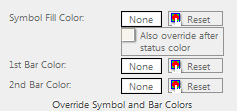
Up to 2 horizontal bars can originate from any one symbol.
-

-
Horizontal bars in the toolbox can fill with any of 50+ patterns.
Change the pattern of a horizontal bar in the toolbox:
-
In the toolbox, double-click a horizontal bar.
-
Under Fill Pattern, make a selection.
If this bar exists in the schedule area, all instances of this bar will change to the new selection.
Bar fill patterns include marbled color patterns.
Marbled bar fill patterns are full-colored bitmaps which will ignore any color fill settings. Use of these bar fill patterns increases the size of printer files and metafiles, especially on high-resolution printers. Thus, printing time may be increased.

-
-
Horizontal bar fill colors can fade to a target color.

Fade the color of a horizontal bar to white:
-
In the toolbox, double-click a horizontal bar.
-
Under Special Color Effects, choose a Type of Effect for fading.
If this bar exists in the schedule area, all instances of this bar will change to the new selection.
-

-
Customize a toolbox horizontal bar's shadow:
-
Double-click the bar in the toolbox that will be changed.
-
Under Shadow Settings,
 Show Shadow.
 -
Choose a Shadow Color from the list.
-
Choose a Shadow Size (Small, Medium, or Large).
-
The Sample Bar at the top of the dialog box will reflect selections made.
If this bar exists on the schedule, all instances of this bar will change to the new shadow and color selection.
-

-
The horizontal bar shape is bordered by a line pattern, such as solid, dotted, and dashed.
Customize a horizontal bar's outline pattern and color:
-
In the toolbox, double-click a bar that will be changed.
-
Choose a Line Pattern.
-
Choose a Line Color.
-
The Sample Bar at the top of the dialog box will reflect selections made.
If this bar exists in the schedule area, all instances of this bar will change to the new selections.
-

-
Arrow size for bars with arrows
Some horizontal bars are lines with arrow endings. The size of these arrow endings can be customized.
Customize a horizontal bar's arrowhead size:
-
Double-click the bar in the toolbox that will be changed.
-
Change the Bar Type to an arrow bar. These include Bar Type #30, 31, and 32.
-
Under Arrowhead Size, choose Small, Normal, or Large.
-
The Sample Bar at the top of the dialog box will reflect selections made.
If this bar exists in the schedule area, all instances of this bar will change to the new selections.
-

-
This option is a way to designate that certain horizontal bars are always on top of other bars.
Customize a horizontal bar to appear on top of other bars:
-
Click
. -
In the schedule area, click once on the left-most symbol attached to the horizontal bar. This will display the Selection menu.
-
Click the Size/Color tab.
-
In the Other Overrides section,
Horizontal bars from this symbol are on top of other bars.
-
