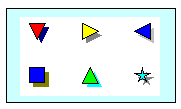
Symbols can display offset shadows in any color.
Customize a toolbox symbol's shadow:
In the toolbox, double-click the symbol to change.
In the Symbol Options dialog, select the Color/Pattern/Size/Shadow tab.
 Show Shadow on Symbol.
Choose a shadow Size (Small, Medium, or Large).
Choose a shadow Color from the list.
