Symbol ValueSet values not adding up

Question:     

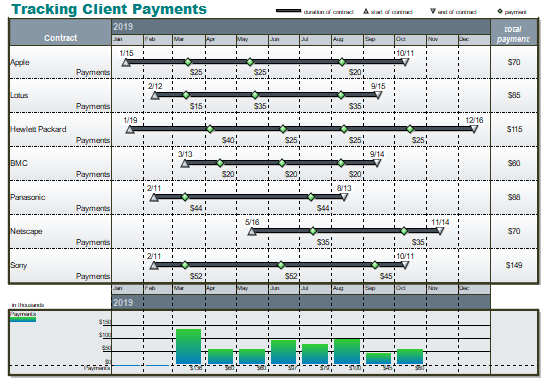
I am using type 4 (symbol) ValueSet and displaying a total in a DataGraph on the last page.  For some reason, the total appears to be wrong.  


Answer:

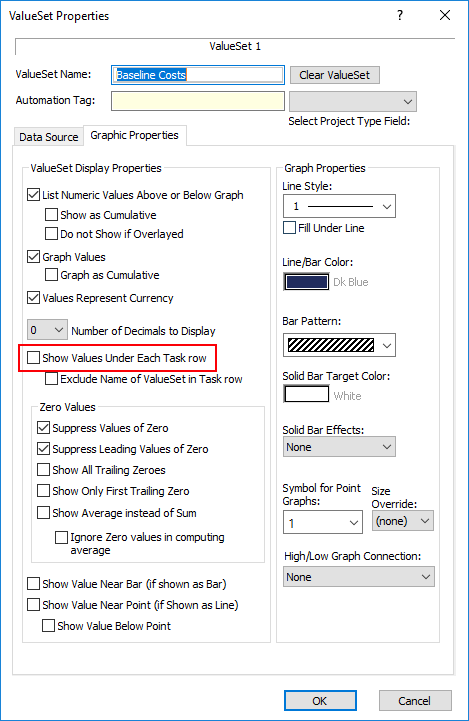
To easily view the values you have entered for each task in the schedule, and to help determine where an entry error might have occurred, turn on the option to display the values along with each task row.  Check to make sure the values shown match the values you expect.  

  1. Right click the DataGraph.  

  2. Choose Create or Edit ValueSets.

  3. Choose the ValueSet.

  4. Choose the Graphic Properties tab.

  5. Show Values Under Each Task row.


Related topics

Built-in Earned Value calculations (Milestones Help)

Track and Graph numbers (Milestones Help)

DataGraph on last page only

DataGraph accuracy

Show curves and bars in DataGraph

Legend and DataGraph Placement


Applies to Milestones Professional:      2017        2019         2021         2023         2025


The fast easy way to schedule your projects:  Milestones Software by KIDASA Software, Inc. www.kidasa.com

Copyright © 2025 KIDASA Software, Inc. All rights reserved.