Insert and remove page breaks
A page break can be forced before any task row.
Insert a page break:
-
Select the task row before which a page break is needed. (The task row selected will be at the top of the new page).
-
Choose Insert | Page Breaks | Break before selected row.
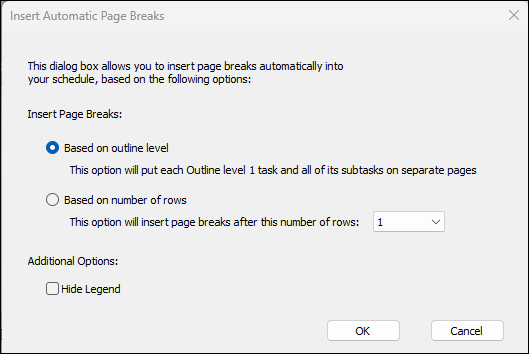
Insert automatic page breaks:
Breaks can be automatically inserted.
- Based on outline level - inserts a page break based on Outline Level 1.
- Based on number of rows - choose to break based on the number of rows. (This is usually not necessary as the number of rows per page can be set via the Layout tab. Sometimes, if row heights have been individually adjusted you may want to set this type of break.)
- Check Hide Legend if page breaks will make the schedule very short with a large legend.
Remove a page break
-
Right-Click the first row of the page with the page break.
-
Click Remove Page Break.
Remove all page breaks
-
Click Insert | Page Break | Remove All Page Breaks.
Related Topics