Fiscal and calendar year alignment
|
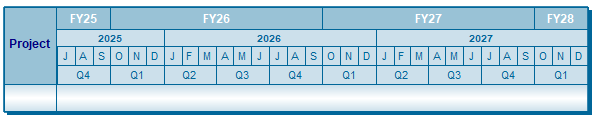
The alignment of the fiscal and calendar years can be customized. If the fiscal year's starting month is from January to June, then the fiscal year aligns itself with the calendar year. For example, if the calendar year is 2025 and the fiscal year begins in January 2025, then the fiscal year will be FY25. This is such a date heading:
If the fiscal year's starting month is from July to December, then the fiscal year aligns itself with the next calendar year. For example, if the calendar year is 2025 and the fiscal year begins in October 2025, then the fiscal year will be based on October to September.
To override this default setting, it's possible to add one year to the starting fiscal year or subtract one year from the starting fiscal year. Add one year to the fiscal years:
Subtract one year from the fiscal years:
Change the fiscal year start month:
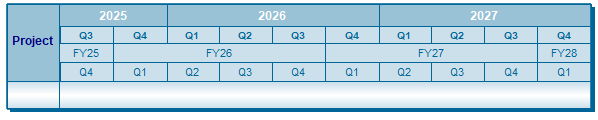
Quarterly Headings based on the Fiscal Year:Date headings with quarters can be offset for both the yearly heading (calendar year quarters) and the fiscal year heading (fiscal year quarters). This schedule's fiscal year begins in October, while the calendar year begins in January. By changing the Start setting, it's possible to show quarters which match the calendar and fiscal years, respectively.
Create a heading like the sample above:
The date heading type Quarters aligns itself with fiscal years (i.e. Q1 aligns with the beginning of the fiscal year). With the start number feature, quarters can be offset to align with the calendar year. For example, if Q2 happens to align with the beginning of the calendar year, then an offset number of -1 can be entered to force Q1 to align with the beginning of the calendar year. Thus, it's possible to have "calendar year quarters" and "fiscal year quarters" in the same date heading. As shown below, quarters are aligned with the calendar years in the top two date heading rows, and aligned with the fiscal years in the bottom two rows.
Create quarter headings for fiscal and calendar years:First, choose which month begins the fiscal year
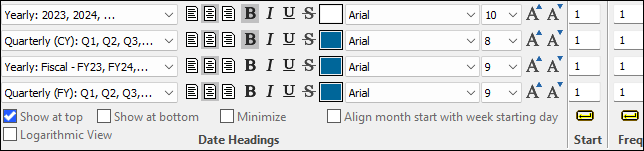
Next, create the date headings with years, quarters, fiscal years, and (again) quarters.
|


 .
.
Related Topics