Example - Create a schedule using Access data
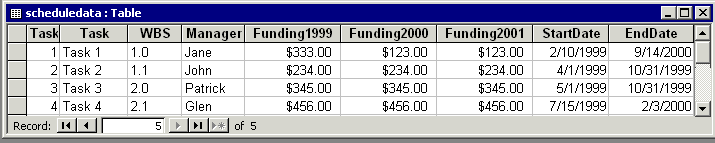
This example code takes the information in this Access table and generates a schedule.
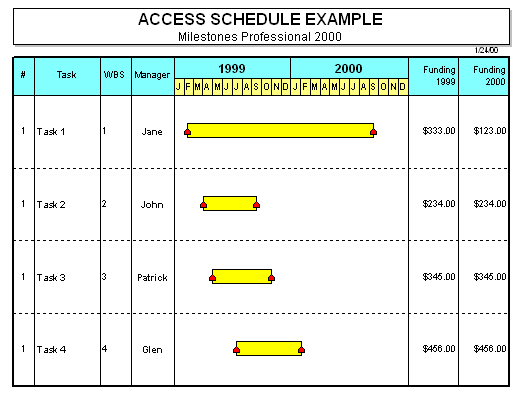
Here's the schedule that is generated:
Here's the code:
Public Sub CreateSchedule()
Dim dbsCurrent As Database
Dim rstTable1 As Recordset
Dim numberoftasklines As Integer
Dim numberofsymbols As Integer
Dim x As Integer
Dim x2 As Integer
Dim TaskNumber As Integer
'Identify the table
Set dbsCurrent = CurrentDb()
Set rstTable1 = dbsCurrent.OpenRecordset("scheduledata", dbOpenTable)
Set objMilestones = CreateObject("Milestones")
With objMilestones
' Locate first record.
rstTable1.MoveFirst
' Activate Milestones Professional Schedule
.Activate
' This template should be in your default template folder for this program to work properly.
.Template "AccessTemplate.mtp"
'Check to see if there is any data on the schedule. If so, delete
numberoftasklines = .GetNumberOfLines
For x = 1 To numberoftasklines
numberofsymbols = .GetNumberOfSymbolsInLine(x)
If numberofsymbols > 0 Then
For x2 = 1 To numberofsymbols
.DeleteSymbol x, 1
.SortSymbols x
Next x2
End If
Next x
TaskNumber = 0
'Start of loop
Do Until rstTable1.EOF
TaskNumber = TaskNumber + 1
On Error GoTo SkipDate
'Use Milestones Professional OLE Automation calls to add symbols to the schedule
.AddSymbol TaskNumber, Format(rstTable1!StartDate, "mm/dd/yy"), 1, ,2
.AddSymbol TaskNumber, Format(rstTable1!EndDate, "mm/dd/yy"), 1, 1, 2
SkipDate:
'Add information to the task columns
.PutCell TaskNumber, 1, rstTable1!Manager
.PutCell TaskNumber, 2, rstTable1!WBS
.PutCell TaskNumber, 3, rstTable1!Task
.PutCell TaskNumber, 4, rstTable1!TaskNumber
.PutCell TaskNumber, 6, rstTable1!Funding1999
.PutCell TaskNumber, 7, rstTable1!Funding2000
.PutCell TaskNumber, 8, rstTable1!Funding2001
'Move to the next record
rstTable1.MoveNext
Loop
' End of loop.
'Close Table
rstTable1.Close
.SetLinesPerPage TaskNumber
.SetTitle1 "ACCESS SCHEDULE EXAMPLE"
.SetTitle2 "Milestones Professional"
.Print 1, 1
End With
Exit Sub
End Sub