Example - Freeform Text Sampler
Summary:
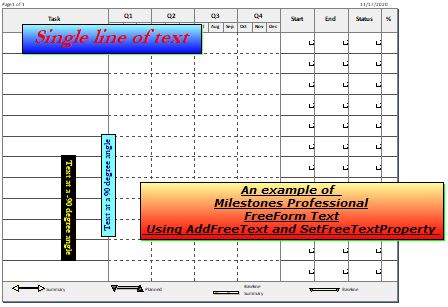
This example shows how to add freeform text and set properties
|
Dim textstring As String, textstring2 As String, textstring3 As String, textstring4 As String Dim freetextindex As Integer With milestonesobject textstring = "An example of " + Chr(13) + "Milestones Professional" + Chr(13) + "FreeForm Text" + Chr(13) + " Using AddFreeText and SetFreeTextProperty " ' Chr(13) is a line break, forces text onto a new row ' string, x position in inches from left, y position in inches from top freetextindex = .AddFreeText(textstring, 2, 2) .setfreetextproperty(freetextindex, "Page", 1) ' Only on page 1 .setfreetextproperty(freetextindex, "Xpos", 4) ' change position to 4 inches in from the left edge .setfreetextproperty(freetextindex, "Ypos", 5) ' change position to 5 inches down from the top .setfreetextproperty(freetextindex, "TextColor", RGB(0, 0, 0)) ' set color to black .setfreetextproperty(freetextindex, "Border", 1) ' turn on the border .setfreetextproperty(freetextindex, "Transparent", 0) ' not transparent, so background color will appear .setfreetextproperty(freetextindex, "BackgroundColor", RGB(255, 0, 0)) ' Set background color .setfreetextproperty(freetextindex, "BackgroundColorTarget", (RGB(255, 255, 153))) 'Set a second color for special effects .setfreetextproperty(freetextindex, "FadeType", 2) ' Use the Fade to top special effect .setfreetextproperty(freetextindex, "Italic", 1) ' Turn on Italic .setfreetextproperty(freetextindex, "Shadow", 1) ' Turn on a shadow .setfreetextproperty(freetextindex, "ShadowColor", RGB(0, 255, 0)) ' Set the shadow color to green .setfreetextproperty(freetextindex, "TextHeight", 22) ' Set the text size to 22 point .setfreetextproperty(freetextindex, "Underline", 1) ' Turn on Underline .setfreetextproperty(freetextindex, "Bold", 1) ' Turn on Bold .setfreetextproperty(freetextindex, "TagInfo", "Text1") ' Add a tag .setfreetextproperty(freetextindex, "FontName", "Verdana") ' Set the font .setfreetextproperty(freetextindex, "TextAlign", 1) ' Use Center Alignment textstring2 = " Single line of text " freetextindex = .AddFreeText(textstring2, 2, 2) ' string, x position in inches from left, y position in inches from top .setfreetextproperty(freetextindex, "Page", 1) ' Only on page 1 .setfreetextproperty(freetextindex, "Xpos", 1) ' change position to 1 inches in from the left edge .setfreetextproperty(freetextindex, "Ypos", 1) ' change position to 1 inches down from the top .setfreetextproperty(freetextindex, "TextColor", RGB(255, 0, 0)) ' set color to red .setfreetextproperty(freetextindex, "Border", 1) ' turn on the border .setfreetextproperty(freetextindex, "Transparent", 0) ' not transparent, so background color will appear .setfreetextproperty(freetextindex, "BackgroundColor", RGB(0, 0, 255)) ' Set background color .setfreetextproperty(freetextindex, "BackgroundColorTarget", (RGB(153, 255, 255))) 'Set a second color for special effects .setfreetextproperty(freetextindex, "FadeType", 2) ' Use the Fade to top special effect .setfreetextproperty(freetextindex, "Italic", 1) ' Turn on Italic .setfreetextproperty(freetextindex, "Shadow", 1) ' Turn on a shadow .setfreetextproperty(freetextindex, "ShadowColor", RGB(111, 255, 111)) .setfreetextproperty(freetextindex, "TextHeight", 38) ' Set the text size to 38 point .setfreetextproperty(freetextindex, "Underline", 0) ' Turn off Underline .setfreetextproperty(freetextindex, "Bold", 1) ' Turn on Bold .setfreetextproperty(freetextindex, "TagInfo", "Text2") ' Add a tag .setfreetextproperty(freetextindex, "FontName", "Garamond") ' Set the font .setfreetextproperty(freetextindex, "TextAlign", 1) ' Use Center Alignment textstring3 = " Text at a 90 degree angle " freetextindex = .AddFreeText(textstring3, 3, 2) ' string, x position in inches from left, y position in inches from top .setfreetextproperty(freetextindex, "textangle", 1) ' 90 degree angle .setfreetextproperty(freetextindex, "Page", 1) ' Only on page 1 .setfreetextproperty(freetextindex, "Xpos", 3) ' change position to 3 inches in from the left edge .setfreetextproperty(freetextindex, "Ypos", 6) ' change position to 3 inches down from the top .setfreetextproperty(freetextindex, "TextColor", RGB(0, 0, 128)) ' set color to navy .setfreetextproperty(freetextindex, "Border", 1) ' turn on the border .setfreetextproperty(freetextindex, "Transparent", 0) ' not transparent, so background color will appear ' Set background color to aqua .setfreetextproperty(freetextindex, "BackgroundColor", RGB(128, 255, 255))
.setfreetextproperty(freetextindex, "TextHeight", 18) ' Set the text size to 18 point .setfreetextproperty(freetextindex, "Underline", 0) ' Turn off Underline .setfreetextproperty(freetextindex, "Bold", 1) ' Turn on Bold .setfreetextproperty(freetextindex, "TagInfo", "Text3") ' Add a tag .setfreetextproperty(freetextindex, "FontName", "Garamond") ' Set the font .setfreetextproperty(freetextindex, "TextAlign", 1) ' Use Center Alignment textstring4 = " Text at a -90 degree angle " freetextindex = .AddFreeText(textstring4, 3, 2) ' string, x position in inches from left, y position in inches from top .setfreetextproperty(freetextindex, "textangle", 2) ' - 90 degree angle .setfreetextproperty(freetextindex, "Page", 1) ' Only on page 1 .setfreetextproperty(freetextindex, "Xpos", 2) ' change position to 2 inches in from the left edge .setfreetextproperty(freetextindex, "Ypos", 4) ' change position to 3 inches down from the top .setfreetextproperty(freetextindex, "TextColor", RGB(255, 255, 0)) ' set color to yellow .setfreetextproperty(freetextindex, "Border", 1) ' turn on the border .setfreetextproperty(freetextindex, "Transparent", 0) ' not transparent, so background color will appear .setfreetextproperty(freetextindex, "BackgroundColor", RGB(0, 0, 0)) ' Set background color to black .setfreetextproperty(freetextindex, "TextHeight", 18) ' Set the text size to 18 point .setfreetextproperty(freetextindex, "Underline", 0) ' Turn off Underline .setfreetextproperty(freetextindex, "Bold", 1) ' Turn on Bold .setfreetextproperty(freetextindex, "TagInfo", "Text4") ' Add a tag .setfreetextproperty(freetextindex, "FontName", "Garamond") ' Set the font .setfreetextproperty(freetextindex, "TextAlign", 1) ' Use Center Alignment End With
|
Related Topics