AddFreeText
Purpose: Add a block of freeform text.
Return Value: (if result variable supplied) the (int) 1 based index of the added freetext block (not set if block not added)
|
Argument |
Type |
Required |
Purpose |
|
1 |
String |
Yes |
Text to add |
|
2 |
Double |
Yes |
X Position, the position in inches from the left edge. Must be positive. |
|
3 |
Double |
Yes |
Y Position, the position in inches from the top edge. Must be positive. |
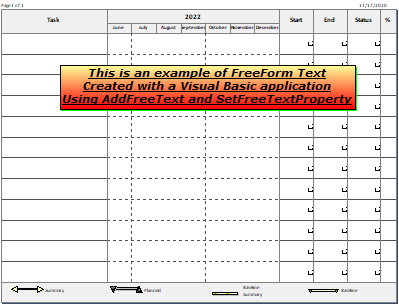
The code below the example adds the freeform text and then sets all of the properties (font, background color, underline, text color, etc.)
|
Public Sub addfreetext() Dim textstring As String Dim freetextindex As Integer With milestonesobject textstring = "This is an example of FreeForm Text" + Chr(13) + "Created with a Visual Basic application" + Chr(13) + "Using AddFreeText and SetFreeTextProperty" freetextindex = .AddFreeText(textstring, 2, 2) ' string, x position in inches from left, y position in inches from top .setfreetextproperty(freetextindex, "Page", 1) .setfreetextproperty(freetextindex, "TextColor", RGB(0, 0, 0)) .setfreetextproperty(freetextindex, "Border", 1) .setfreetextproperty(freetextindex, "Transparent", 0) .setfreetextproperty(freetextindex, "BackgroundColor", RGB(255, 0, 0)) .setfreetextproperty(freetextindex, "BackgroundColorTarget", (RGB(255, 255, 153))) .setfreetextproperty(freetextindex, "FadeType", 2) .setfreetextproperty(freetextindex, "Italic", 1) .setfreetextproperty(freetextindex, "Shadow", 1) .setfreetextproperty(freetextindex, "ShadowColor", RGB(0, 255, 0)) .setfreetextproperty(freetextindex, "TextHeight", 22) .setfreetextproperty(freetextindex, "Underline", 1) .setfreetextproperty(freetextindex, "Bold", 1) .setfreetextproperty(freetextindex, "TagInfo", "Tag Text") .setfreetextproperty(freetextindex, "FontName", "Verdana") .setfreetextproperty(freetextindex, "TextAlign", 1) End With End Sub End Module |
|
Related Topics