SetCurtainProperties
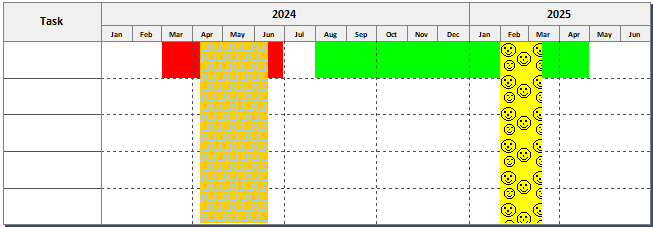
Purpose: Set the properties of the curtains. A curtain is used to shade a date range on the schedule.
Returns: none
|
Argument |
Type |
Required |
Purpose |
|
1 |
Integer |
Yes |
Curtain number, 1 based (must already exist) |
|
2 |
Variant |
Yes |
Start Date/Time |
|
3 |
Variant |
Yes |
End Date/Time |
|
4 |
Integer |
Yes |
Curtain pattern Color |
|
5 |
Integer |
Yes |
Curtain background Color |
|
6 |
Integer |
Yes |
Curtain fill patterns (1-27) |
|
7 |
Integer |
Yes |
Curtain border 1: border 0: no border |
|
8 |
String |
No |
Curtain name (so that it can be referred to by .SetTaskLineCurtain method) If argument 8 is included, but it is a zero length string or a string with a blank in the first character, then the name, if any, is removed. |
Example: Add 4 curtains and set properties
|
Public Sub Addcurtain(objmilestones As Object) With objmilestones .Activate() .SetStartAndEndDates("01/01/2024", "06/30/2025") 'set up curtains .setmiscproperty("ShowCurtainsOverHorzGridlines", 1) 'Curtain 1 'Curtain 2 'Curtain 3 'Curtain 4 ' Set Curtain Properties(Curtain number, start date, end date, pattern color, background color, fill patterns (1-27), border, curtain name (optional))
'skyblue and gold boxes 'black and yellow smiley faces .settasklinecurtain(1, 1, "red", "3/1/2024", "6/30/2024") .settasklinecurtain(1, 2, "green", "8/1/2024", "4/30/2025") .Refresh()
|