SetTaskLineShade
Purpose: Set the shading for an individual task.
Returns: none
|
Argument |
Type |
Required |
Purpose |
|
1 |
Integer |
Yes |
Task Number |
|
2 |
Integer |
Yes |
Section of the schedule: 0,1,2 (0=left, 1=schedule, 2=right) |
|
3 |
Integer |
Yes |
Color. (See color numbering) A value of -1 will reset the color to the default. |
|
4 |
Integer |
No |
Custom red (if arguments 4-6 are used then argument 3 is ignored) |
|
5 |
Integer |
No |
Custom green (if arguments 4-6 are used then argument 3 is ignored) |
|
6 |
Integer |
No |
Custom blue (if arguments 4-6 are used then argument 3 is ignored) |
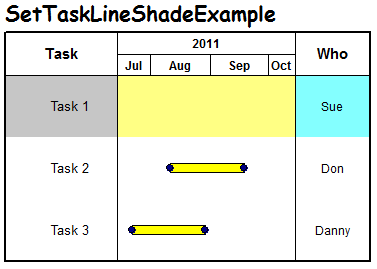
Example: Sets the left columns of a task line (task 1) to gray, the middle to light yellow, and the right to light blue.
With objMilestones
.SetTaskLineShade 1,0,rgb(192,192,192) 'gray
.SetTaskLineShade 1,1,rgb(255,255,128) 'light yellow
.SetTaskLineShade 1,2,rgb(128,255,255) 'aqua
End With