Question:
In the date entry area, how can we have the end date calculated? For example, I do not know the end date, but I know it's 11 weeks from the start date. In Excel, we could take the date and add 77 (for 11 weeks).
|
Answer:
You can enter a duration in a Duration column, and Milestones draws the finish symbol for you.
Set up a Duration column in weeks:
-
Choose Insert | New Column | Duration and choose Duration.
-
Select the column, then click Properties.
-
In Duration Settings, change Show Duration in to Weeks.
Draw the task from its duration:
-
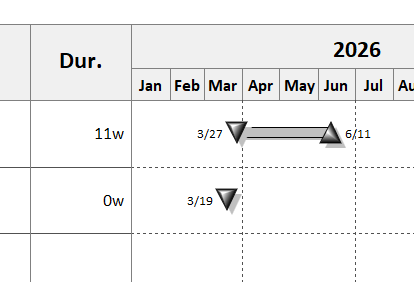
Add a start symbol on the task row, on the start date.
-
Click the task's Duration cell. On the Selection tab, type the duration (for example 11w) in the cell text box and click Update Cell Text.
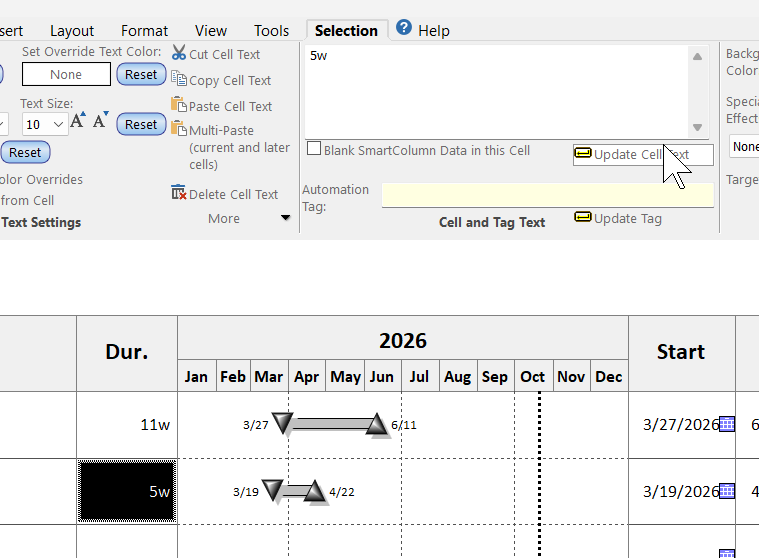
Milestones draws the task: a bar and a finish symbol that many weeks after the start. Change the duration again and the task follows.
The task uses the second row of the toolbox. To use a different row, right-click the Start or End column heading and choose Properties.
 Durations count working time, not calendar days, so 77 days would mean 77 working days. Weeks avoid that, and holidays on the schedule push the end date out further.
|
 2023