How to track and report multiple projects
Read how a consulting team from a Fortune 100 Technology company created a dynamic dashboard to track and report on multiple projects for a strategic customer.
Download the schedule (PDF) Milestones Professional 2019 Milestones Professional 2021
As a service delivery manager for a global IT company, I was assigned to a strategic account that required visibility to multiple projects delegated to my team. To succeed in this engagement I needed a creative approach that would allow me to organize and control multiple projects from a single focal point. As an experienced user of multiple project management software applications, I decided Milestones Professional by KIDASA Software was the best choice because of its superior ability to create Gantt chart dashboards that can be used as focal points to schedule, track, and report on multiple projects.
My Goals:
1. Create a dashboard to track project details and provide quick glance status of all projects.
2. Schedule and display ongoing tasks, (tasks with no definitive end date).
3. Track customer satisfaction scores for all completed tasks.
4. Ensure historical project updates are captured and archived.
5. Filter my dashboard to provide multiple reports for quick delivery.
Here’s a detailed breakdown of how I used Milestones Professional to achieve all my goals and how I delighted team members, customer contacts, and key management personnel in the process:
1. Create a dashboard to track project details and provide quick glance status of all projects.
Before I joined the team, my customer received status reports in a lengthy Microsoft Word document. Unfortunately, with the amount of e-mail we all receive on a daily basis, it was unrealistic to expect all project participants to read the entire document. Using Milestones Professional, I was able to fit all relevant project information onto a single dashboard. Figure A below is only a portion of my schedule, but it demonstrates the ability to show multiple project data points in a single, unified, Gantt chart, dashboard format. Notice each task displays a project’s status, description, sponsor, assigned resource, and latest update…along with start/end dates. Each symbol or task line can even contain hyperlinks to additional documentation if needed. A truly dynamic dashboard!

*A Milestones Professional “Stoplight column” was used to convey project status, perfect for giving everyone a quick way to see what overall condition (red, yellow or green) each project is in.
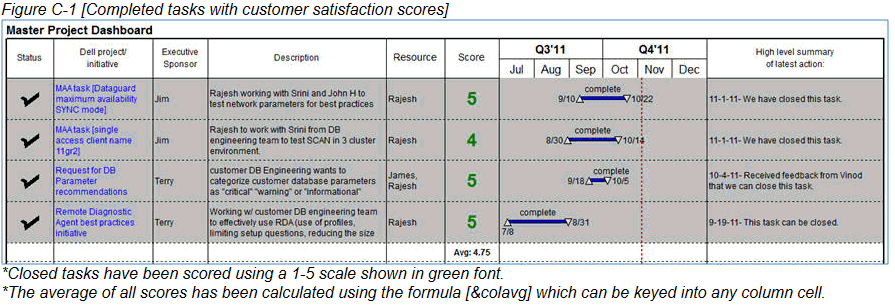
*Shaded tasks along with check mark symbols in the status column are used to indicate closed tasks.
2. Schedule and display ongoing tasks, (tasks with no definitive end date).
My team is often assigned to tasks that have no end date. We simply work on these tasks until our customer provides official confirmation that work is complete. For these tasks, I used Milestones Professional’s “initialize to current date of schedule” symbol constraint function to create ongoing tasks, (or tasks with no definitive end date). The red arrow symbol in Figure B-1 below shows this constraint in use which makes the symbol automatically adjust to the current date of the schedule. This also extends the blue horizontal connector forward to keep the task moving with the current date.
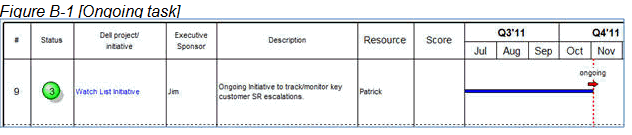
*The “Initialize to current date of schedule” symbol constraint can be used to create tasks that automatically roll forward to the current date of the schedule. This is ideal for ongoing tasks with no definitive end date.
When the task is complete, I deactivate the symbol constraint, change the symbol shape (since it’s no longer an ongoing task), and edit the “status” stop light column to display a check mark symbol. Lastly, I shade the task to gray as depicted in Figure B-2 below.

3. Track customer satisfaction scores for all completed tasks.
Another goal of my plan was to start capturing customer satisfaction scores on completed projects/tasks. I felt it was important to allow our customer contacts to provide feedback on the work my team provided. We came up with a simple 1-5 performance scale rating with 5 being the best. After tasks were completed I sent an e-mail to the appropriate customer contact asking for a rating. When I received their score, I added it to the “score” column on my dashboard. Figures C-1 below illustrates closed tasks with customer satisfaction scores.
4. Ensure historical project updates are captured and archived.
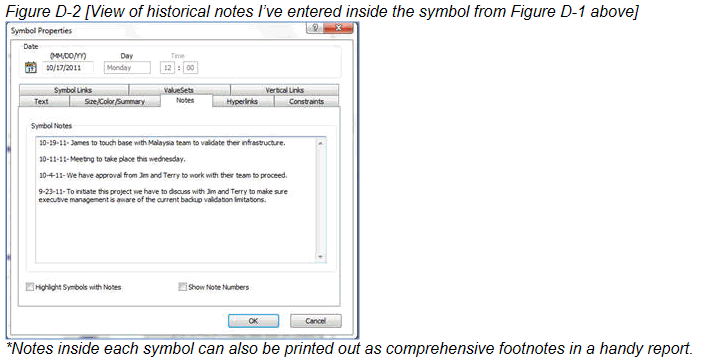
Since all project participants met weekly to go over status and provide feedback, I knew it would be critical to capture both current and historical updates. That way, if we ever have questions about what was stated in the past, I could quickly review archived updates and get additional context. Milestones Professional’s Symbol Notes capability lets me copy/paste each weekly update I receive inside symbols (in this case I used the start symbol). This allows me to track and archive the update history. Figure D-1 and D-2 below show how it works.

5. Filter dashboard to provide multiple reports for quick delivery.
I knew when I created a dashboard of all my team’s project activity that my customer would likely ask to view the data in a variety of ways. For example, a report on critical projects only, or information on recently closed tasks, or even a view of projects filtered by a particular executive sponsor. Milestones Professional’s filtering capability made this a snap. I also appreciate the ability to save filters, hide tasks and columns when needed and even filter by symbol type. It’s great to know that my dashboard can generate so many meaningful reports from just a few clicks of my mouse.
When it’s time to send my reports I have plenty of options. I can copy/paste into an e-mail, a Microsoft Word document, or a Microsoft PowerPoint presentation, or even convert it into an Adobe PDF file. Lastly, KIDASA Software has a free viewer available for download. Once a Milestones schedule is opened in the Viewer, you can print, filter, zoom, view symbol notes, access symbol hyperlinks and more.
Senior level management personnel, (from my company and client account), are all delighted by my team’s ability to track and report our projects. In fact, we have received outstanding feedback on multiple occasions regarding how easy we’ve made it to keep everyone on the same page. We are eager to continue working closely with KIDASA Software to keep them informed of how their software works for our team. Thankfully, they are already considering a few enhancements we suggested that will allow us to do even more. We remain very excited about future versions of this wonderful application!
For more information you can: Download the schedule (PDF) Milestones Professional 2015 Milestones Professional 2017
 2019
2019