Question:I have a huge 60 page very dense schedule. It's very slow. What can I do to speed up the screen refreshing? |
Answer:
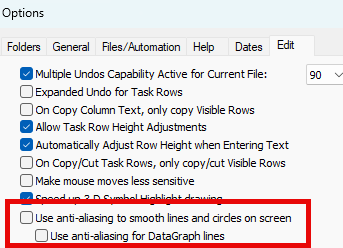
One thing you can quickly turn off is anti-aliasing. Anti-aliasing was added to the software to improve the smoothness of shapes and lines.
Turn off anti-aliasing
- Click the Tools tab.
- On the Edit tab, uncheck both of the options shown below: