|
A symbol, and bars/symbols attached to it (task bar), can be copied to another task row on the same page or another page, or can be copied to another part of the same task row.
Copy a symbol or task bar to another task row, on the same page:
-
Click  (the toolbox Arrow tool.) (the toolbox Arrow tool.)
-
Press the Control key.
-
While continuing to press the Control key, hold the left mouse button down and drag the symbol to the new task row.
-
Release the mouse button.
Copy a symbol or task bar to another task row, on the same or different page:
-
Click (the toolbox Arrow tool.)
-
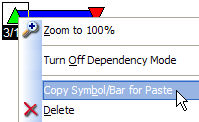
Right-click the symbol and choose Copy Symbol/Bar for Paste.
-
-
If needed, scroll to the appropriate page.
-
At the destination task row, right-click in any column cell and choose Paste Symbols.
-Or-
-
Click (the toolbox Arrow tool.)
-
Click once on the symbol.
-
In the Selection tab of the menu, choose Copy from the Current Object: Symbol section.
-
At the destination task row, right-click in any column cell and choose Paste Symbols.
Copy and paste symbols and bars on the same task row:
-
Click (the toolbox Arrow tool.)
-
Press the Control key.
-
While continuing to press the Control key, hold the left mouse button down and drag the symbol to another location on the same task row..
-
Release the mouse button.
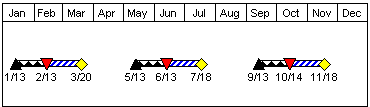
 Attached symbols and bars will move with the symbol. Attached symbols and bars will move with the symbol.
|