|
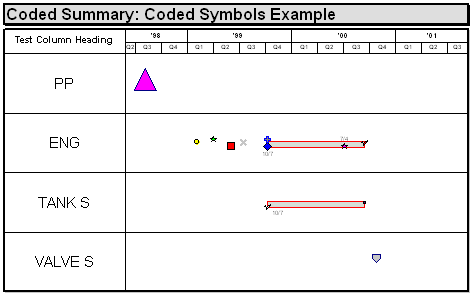
The Coded Symbols chart type makes it easy to map a Microsoft Project schedule to a presentation Milestones chart.
 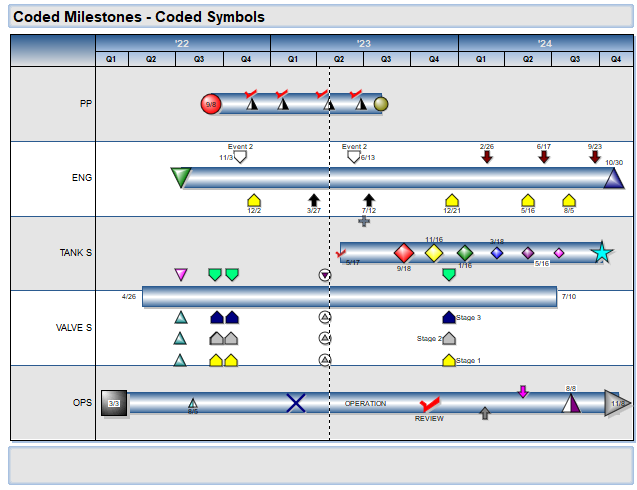
The Coded Symbols chart type makes it easy to map a Microsoft Project schedule to a presentation Milestones chart.
The technique is straightforward:
-
Set up a few Microsoft Project fields (text and number fields not otherwise being used in the Microsoft Project schedule)
-
One of the required fields is the Code field. All Microsoft Project tasks with the same entry for the Code field will be placed on the same row on the Milestones schedule.
-
Other required fields (milestone level, baseline level, actual level, symbol color, date placement and text placement) control how the information is presented.
-
Other coded import formats are available.
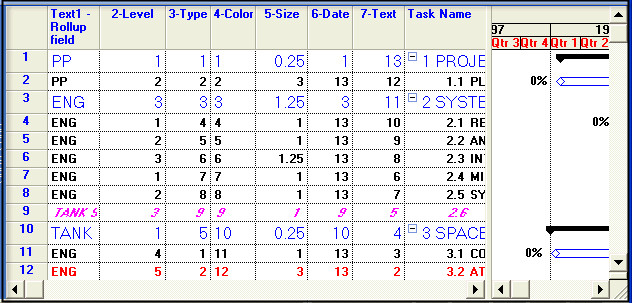
Here's an example of how a Microsoft Project schedule might be coded. (The numeric fields are Microsoft Project Number fields. The Code field (AKA Rollup field) is a Text Field (Text 1 in the example below):
-
Row Name: A text field that contains the row names by which tasks will be grouped.
-
Milestone Level: A number field that contains the level for each Milestone (upper, middle, lower = 1, 2, 3)
-
Toolbox Symbol Type: A number field containing the Toolbox Symbol Type
-
Symbol Color: A number field that contains the desired Symbol Color:
-
Symbol Size: A number field with the desired Symbol Size (0.25 to 5.0)
-
Symbol Date Placement: A number field with the appropriate Symbol Date Placement
-
Symbol Text Placement: A number field with the appropriate Symbol Text Placement
|