 Create
or Edit Custom Symbol to access the Symbol Maker.
Create
or Edit Custom Symbol to access the Symbol Maker.Milestones Simplicity offers a built-in Symbol Maker, allowing users to create a variety of symbol shapes. These user-defined symbols can be saved as symbol files (.SYM files). Those .SYM files can then be added as symbols in the Toolbox, to be used as any other symbol.
On the toolbar, choose Tools | Other
Tools | Create
or Edit Custom Symbol to access the Symbol Maker.
As shown below, symbols are created by clicking on grid points. Those points are connected by lines which define the symbol's shape. A preview of the symbol is shown to the right as a green shape.
All enclosed parts of the shape, as well as single line extensions, constitute the symbol shape.

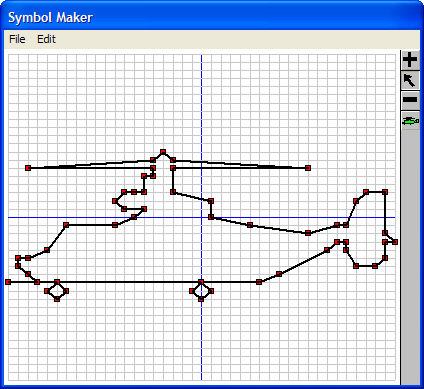
Create a simple, one-part symbol
