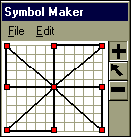
It is possible to use the Symbol Maker to create symbols with more than one enclosed area. For example a circle would be a single-part symbol, while a pinwheel would be a multiple-part symbol.
 pinwheel.sym
Create a multi-part, user-defined symbol:
Choose Tools | Other Tools |  Create or Edit Custom Symbol.
The Symbol Maker blank grid will appear. Click on the add tool  which appears to the right of the grid.
Click on the grid with the left mouse button. A red grid point appears.
Click again to place a second point on the grid, and see the line appear between the first and second points.
Continue placing points on the grid until an enclosed figure has been created (end by clicking on the original point, to enclose the shape). For example, each of the four triangles above are enclosed shapes.
Once one enclosed part of a symbol has been created, click once with the right mouse button at the place to begin the next piece of the symbol.
Next, use the left mouse button to click on grid points until the next piece of the symbol is completed.
Click with the right mouse button at the spot to begin the next piece. Continue in this fashion until the multiple part symbol is complete.
Click the  button to undo the most recent additions to the shape.
To move established points from one location to another, click the  button and then click and drag existing points on the grid.
When finished, click File | Save to Symbol file or Save as Embedded Symbol.
File | Save to Symbol File to save the .SYM file to the Symbols folder. Any Milestones schedule can use this symbol. These symbols can be embedded later.
File | Save as Embedded Symbol to save the symbol as a part of that schedule. Embedded symbols automatically have EMBEDDED: attached to the beginning of the symbol name, e.g. EMBEDDED:symbol1.sym.
Embedded symbols are recommended a schedule will be shared with others.
Name the file and Save.
Choose File | Exit Symbol Maker.
The next step is usually adding the user-defined symbol to the Toolbox.
Notes:
Each symbol can have as many as 200 points with up to 20 different sections. Each section must be a complete outline, and each section must start and end at the same point. Sections are limited to 20 points. For example, the pinwheel is a symbol with four parts. Each triangle is a separate symbol part.
