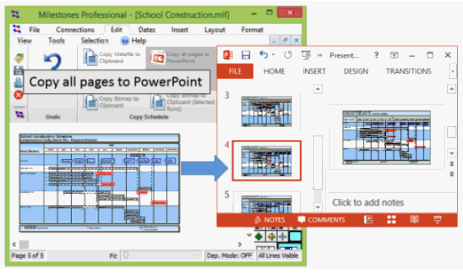
Paste multi-page schedules into PowerPoint

Question:     

I have a 10 page schedule which I need to paste into PowerPoint.  It is tedious to have to paste it in one page at a time.  Is there an easier way?


Answer:

Yes.  

  1. On the Edit tab, choose Copy All Pages to PowerPoint. 
  2. At the prompt choose YES if the schedules should be pasted into a new PowerPoint presentation.  (To add the schedules onto the current presentation choose NO.)
  3. Milestones will copy/paste the schedules one by one into PowerPoint.


Related topics

Can't ungroup schedule picture in PowerPoint    

Copy all pages to PowerPoint

Import Microsoft Project files to PowerPoint

Link to a specific PowerPoint slide

Only part of schedule appears in PowerPoint


Applies to Milestones Professional:      2017        2019         2021         2023         2025


The fast easy way to schedule your projects:  Milestones Software by KIDASA Software, Inc. www.kidasa.com

Copyright © 2025 KIDASA Software, Inc. All rights reserved.