Microsoft Project Import - Build a schedule and link it to Project
Build a "free-form" presentation schedule and update it from Microsoft Project
|
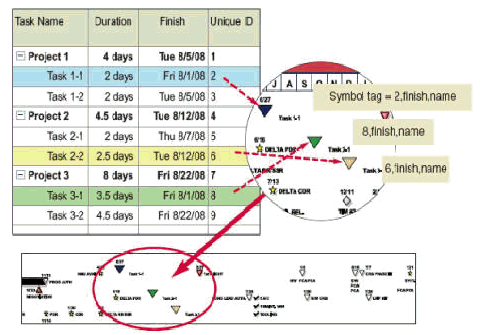
Schedules like the one to the right can be built freeform. Then, the symbols and rows can be "tagged" to tasks in Microsoft Project. Once built and tagged, Milestones refresh can be used to keep the schedule up-to-date whenever the Microsoft Project schedule changes. |
|
|
|
|
|
|
Tag SymbolsSymbols are tagged with a unique identifier from Microsoft Project, followed by the name of the date field and the name of the field to be used for symbol text. Tag each symbol with the corresponding Unique ID, date field, and an optional fields for Symbol Text and Symbol Note View/change the symbol tag.View/change the symbol tag. Tag each symbol with the corresponding unique identifier, date field, and optional fields for symbol text and symbol notes. In Milestones:
|
|
|
|
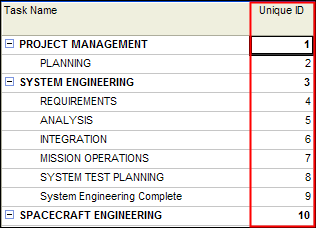
Tag Rows and columnsTag the rows: To update Milestones Professional columns with fields from Microsoft Project, tag each row of the Milestones schedule with the corresponding unique identifier from Microsoft Project. Tag the columns: For each Microsoft Project Field (such as BCWP, Name, WBS) to be added to the Milestones Professional schedule, tag a column. See: |
|
|
|
|
|
|
Keep the presentation schedule up-to-dateNow that the schedule’s task rows, column headings, and symbols have been tagged, the schedule can be "refreshed" or updated with a Microsoft Project, Project Server or Project Online MPP file.
|

 .
.

Related Topics