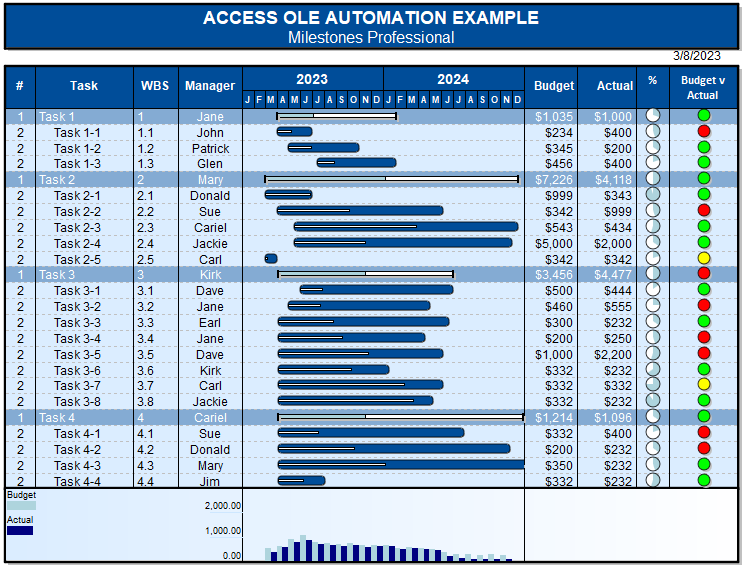
Example 9 - Microsoft Access graphic file generation
Creates a schedule using Microsoft Access VBA
|
Public Sub CreateSchedule() ' this function updates the schedule using data from a table Dim dbsCurrent As Database 'Identify the table With objMilestones 'Start with a template 'Start of loop On Error GoTo SkipDate 'Keep Milestones, Etc. schedule open Exit Sub
|
Table:
| OutlineLevel | Task | Manager | Budget | Actual | StartDate | PercentComplete | EndDate |
|---|---|---|---|---|---|---|---|
| 1 | Task 1 | Jane | $0.00 | $0.00 | 0 | ||
| 2 | Task 1-1 | John | $234.00 | $400.00 | 4/1/2023 | 44 | 6/30/2023 |
| 2 | Task 1-2 | Patrick | $345.00 | $200.00 | 5/1/2023 | 33 | 10/31/2023 |
| 2 | Task 1-3 | Glen | $456.00 | $400.00 | 7/15/2023 | 22 | 2/3/2024 |
| 1 | Task 2 | Mary | $0.00 | $0.00 | 0 | ||
| 2 | Task 2-1 | Donald | $999.00 | $343.00 | 3/1/2023 | 99 | 6/30/2023 |
| 2 | Task 2-2 | Sue | $342.00 | $999.00 | 4/1/2023 | 44 | 6/6/2024 |
| 2 | Task 2-3 | Cariel | $543.00 | $434.00 | 5/15/2023 | 55 | 12/15/2024 |
| 2 | Task 2-4 | Jackie | $5,000.00 | $2,000.00 | 5/15/2023 | 33 | 12/1/2024 |
| 2 | Task 2-5 | Carl | $342.00 | $342.00 | 3/1/2023 | 22 | 4/1/2023 |
| 1 | Task 3 | Kirk | $0.00 | $0.00 | 0 | ||
| 2 | Task 3-1 | Dave | $500.00 | $444.00 | 6/1/2023 | 15 | 6/30/2024 |
| 2 | Task 3-2 | Jane | $460.00 | $555.00 | 5/1/2023 | 23 | 5/1/2024 |
| 2 | Task 3-3 | Earl | $300.00 | $232.00 | 4/4/2023 | 33 | 6/19/2024 |
| 2 | Task 3-4 | Jane | $200.00 | $250.00 | 4/4/2023 | 44 | 4/20/2024 |
| 2 | Task 3-5 | Dave | $1,000.00 | $2,200.00 | 4/4/2023 | 55 | 6/6/2024 |
| 2 | Task 3-6 | Kirk | $332.00 | $232.00 | 4/4/2023 | 66 | 1/18/2024 |
| 2 | Task 3-7 | Carl | $332.00 | $332.00 | 4/4/2023 | 77 | 6/6/2024 |
| 2 | Task 3-8 | Jackie | $332.00 | $232.00 | 4/4/2023 | 88 | 5/10/2024 |
| 1 | Task 4 | Cariel | $0.00 | $0.00 | 0 | ||
| 2 | Task 4-1 | Sue | $332.00 | $400.00 | 4/4/2023 | 22 | 7/29/2024 |
| 2 | Task 4-2 | Donald | $200.00 | $232.00 | 4/4/2023 | 33 | 11/26/2024 |
| 2 | Task 4-3 | Mary | $350.00 | $232.00 | 4/4/2023 | 44 | 12/29/2024 |
| 2 | Task 4-4 | Jim | $500.00 | $525.00 | 4/4/2023 | 55 | 8/4/2023 |
AccessExample.MTP:
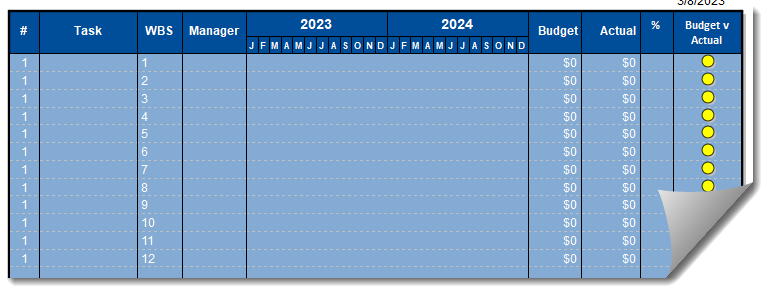
Resulting schedule: