
(Click the question title for the answer)
Show hidden columns when all are hidden
I hid the only column on my schedule. Now my schedule has no columns. How do I add a column on the left?
Two symbols on top of each other
Is there any way to move milestones in front or behind when they are stacked on top of each other with overlapping dates? I don’t want to use vertical symbol position and move to another level.
Bar colors change unexpectedly after refresh
I have a schedule with several joined bars. P3 is supposed to be filled blue but stays white. Then, after I refresh, the bar for P2 disappears and P3 fills as expected:


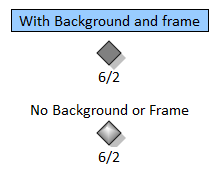
Some of my symbols have a background and a box surrounding the symbol text. I would like to get rid of this.
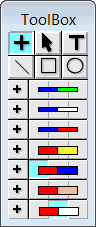
See bar status color in toolbox
My bars are all the same color before status, but they have a different after status color, how do I tell them apart in the toolbox?
Link to Active MS Project Tasks not working
I am trying to bring tasks into my Milestones schedule from Project server. I'm not getting any errors, but nothing is coming in
Can anyone advise how I may remove shading under a bar and legend entry?
Get list of all Project UIDs in Milestones schedule
I'm using Symbol Links to an MS Project file. Is there a way to get a list in Milestones Pro of all the UIDs I am linked to?
Numbers or letters inside symbols
I need to have numbers inside my triangle symbols. Right now I am using symbol text and the text is pretty small and hard to re-size when the symbol sizes change. Is there an easier way to do this?

Shifting symbols, values, and curtains
I have Type 1 ValueSet values entered for each month of the year. I need to shift all symbols and values one year. How can I do that? What about shifting curtains?
I want to show that my task doesn't have an ending date. It should have an arrow on the right to show that it continues into the future

Is there a way to quickly see the Unique IDs on each symbol while I'm working on a Milestones chart?
