(Click the question title for the answer)
|
Replicate a task row date heading I would like to put a date heading roughly every 12 rows so that I can see the date range no matter where I am on the page. Change the date range for a single page on the schedule When you have a long duration project (15 years) is there a way to make the Date Range for Page 1, go from the present date and mark it ending at the half way point, then, for page 2, can page 2 pick up at the half way point and go to the 15 year end point. This way, the 1st half of the project is on page 1 and the 2nd half of the project is on page 2. Add multiple milestones on different levels Can you explain why the solid green bar shown below always draws on the row above where I am trying to put it? I can shift it down to the correct row, but I want it to draw in the correct row. The other solid bars work correctly. My Milestones schedule is blocking the lower part of the selection bar. Basically, I can’t see the drop-down option to select “Name.” I tried adjusting my view of the schedule by making it larger and smaller, but I still can’t see the option on the selection tab. Do you know how I can fix this view? Symbol text too far away from symbol My symbol text is spaced too far away (vertically) from my bar.
Move a symbol on a crowded schedule and get the exact date I have a symbol I want to move that is very close to other symbols and connectors. When I try to move it, I often get other symbols instead. How do I move one symbol without accidentally moving others?
|
|
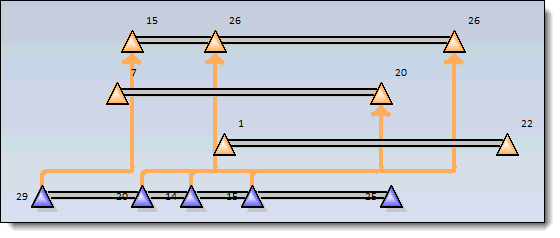
I have a schedule with quite a few overlapping vertical links and it's very difficult to determine which symbols are connected. Any suggestions? Here's an example:
Hide several task rows in a single operation I know how to hide a single task. Is there a way to hide several tasks in a single operation? All of my date columns display small calendar icons. Is there a way to remove these? |
|
|