Tips & Tricks for May 2022

(Click the question title for the answer)
How do I add a page to my schedule?
I want to have text inside a horizontal bar on my schedule. Is this possible?

Apply a template to an existing schedule
When I apply a template to an existing schedule, the symbols and connectors do not look as I expected. What could cause this?
Change the default save location
I would like to change the default location where charts are saved. How can I do this?
On my Summary line is there any way to make the appearance cleaner? The Project 8 and Project 10 symbols are overlapping:
I have created a schedule for proposal purposes, and I want to turn it over to the execution team. The execution team wants to be able to maintain the original schedule bars, but include actual bars that they can status. What's the best way to do this?
I imported my Microsoft Project schedule but some of the text doesn't show in the columns. I know I can increase the row height and see everything. Just wondering if there is an automatic way to do this.
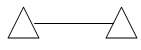
Link two symbols to show a date range
If I want to link two symbols with a line to show a date range in dates, how do I do that? For example:
Limit on the number of symbols
Is there a limit to the number of task rows or milestones symbols that can be used on one schedule?
We are using two different symbols with text to symbolize "Completed" and "To Be Completed." Each time a milestone is completed, we have to change the symbol and re-enter its text. Is there a faster way?
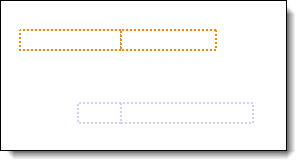
Can you tell me how to remove the line in the middle of the bar? It seems to be at the schedule's current date.
 2017
2017