Make date headings smaller

Question:     

How do you set the height for the headers years and months, they seem really deep, taking up valuable space?


Answer:

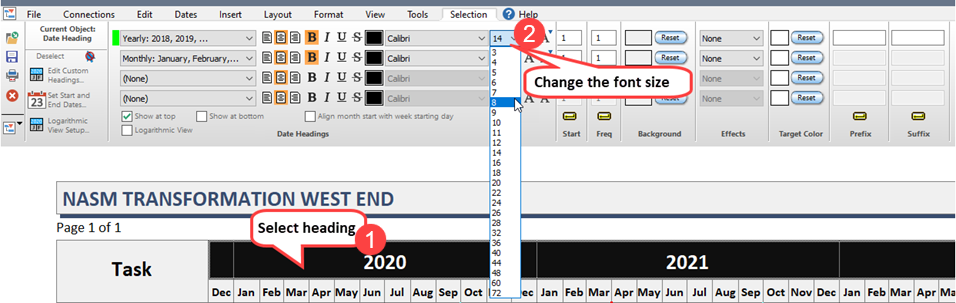
  1. Click once on the date heading area to select.
  2. Change the font size.  The date heading area size adjusts as the font size changes.   


Related topics

Set the date range

Date heading only shows letter on some pages  

All you need to know about date headings

Logarithmic date headings

Make some of the date headings longer

Fiscal and calendar quarters

Date heading increments don't fit

Date Headings (Milestones Help)


Applies to Milestones Professional:    2019        2021        2023         2025


The fast easy way to schedule your projects:  Milestones Software by KIDASA Software, Inc. www.kidasa.com

Copyright © 2025 KIDASA Software, Inc. All rights reserved.