Symbol text crowded next to symbols

Question:

I have an inherited file that puts the symbol and bar names crowded right next to them. The workaround is to add 3 spaces. Is there a global fix?

Answer:

Most likely the schedule's Adjust Horizontal Symbol Text Position setting is set very close. It applies to every symbol, so changing it fixes the whole schedule at once, with no spaces needed.

  1. On the Tools tab, click Edit.

  2. Under Adjust Horizontal Symbol Text Position, the choices run from Super Close, Closest and Closer to Normal, Further and Furthest. Pick Normal, or Further for more space.

  3. Click OK.

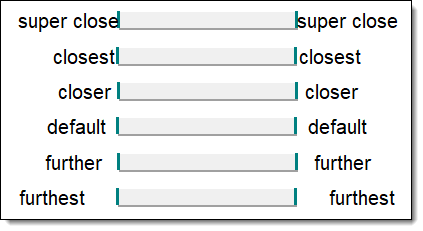
Each setting, from Super Close to Furthest (Normal is the default):

Bar text at each Adjust Horizontal Symbol Text Position setting, from super close to furthest

If you added spaces as a workaround, take them out again afterwards.


Related topics

Get text closer to milestones

Symbol text is too far away from symbol

Adjust the position of symbol within a task row to relieve crowding

Move symbol text to another location on a crowded schedule


Applies to Milestones Professional:    2023         2025


The fast easy way to schedule your projects:  Milestones Software by KIDASA Software, Inc. www.kidasa.com

Copyright © 2026 KIDASA Software, Inc. All rights reserved.