Fill symbols/bars to status date
|
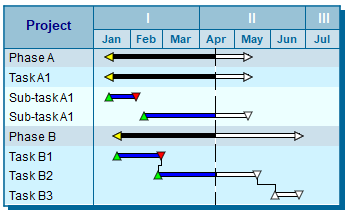
The Symbols - Fill to Status Date and Bars - Fill to Status Date feature causes symbols and bars to be filled up to the status date. After the status date, the symbols and bars will show the after status color. Symbols will show the after status (incomplete) shape if specified in the toolbox. The default status date is the current date. This can be adjusted using a Percent Complete SmartColumn, a status symbol, or and Date Offset entry.
Turn fill to status dates on:
A check mark indicates that the feature is on.
The following example has both Fill Symbol to Status Date and Fill Bar to Status Date turned on.
Bars #15, 27, 29, 38, 43-46, 51, 68, 69, and 70 ignore date sensitivity.
|

Related Topics