Tips & Tricks for December 2021

(Click the question title for the answer)
Make the schedule more compact
How do I get a multi-page schedule down to one page?
Entered percent complete changes to different value
When using a Percent Complete SmartColumn, I enter a percent complete value, e.g. 72%, and the value is then displayed as another value, e.g. 80%. Why is that and how can this be corrected?
Focus on certain months in a year
Are you able to focus in on certain months within a year, (i.e. – adjust the timescale) so that the timescale will be more compact in outlying years/months granting more space in the area around time now?
Hide the dates on summary lines
When I roll-up all lower-level task bars to the summary line, I would like to hide the symbol dates. Is this possible?

Toolbox drawing tools are grayed out
I can't seem to invoke the "line, box, circle" row in my toolbox. It remains grayed out. What am I doing wrong? I am using the Standard Toolbox view. I really need the "line tool" right now.
Erase blue boxes around symbol descriptions
I cannot figure out how to erase the blue box around the task descriptions that are imported from MS Project.
Can I lock some of my symbols to a specific dates?
I have purchased Milestones Professional. When I start the program I get the message: This is a locked trial version. What have I to do?
I'm in a time crunch. I need to prepare a "report" from two pages that shows all information on one page. Ideally, the page would be output in portrait to a printer where the paper size could then be selected.
Can several schedules be merged together?
Limit the legend to first and last page
Is it possible to show the legend only on the first and last pages of my schedule?
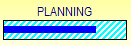
Show a bar with a percent complete thermometer
I would like a bar with a percent complete "thermometer". Does Milestones have that?

 2017
2017